
Scanner test integrated into merchandise management
Many false alarms in the securPharm system are still caused by incorrectly set scanners. These do not read the pack data correctly and transmit an incorrect code to the securPharm system, which leads to a false alarm. To make it even easier to check the scanners, securPharm and NGDA are now making the existing scanner test in the ERP system available as a digital test code. When scanning the Data Matrix code of the test pack, verifying bodies receive various feedback messages that indicate whether the tested scanner is set correctly or why the pack code was not read correctly. The code should be scanned first:
The following merchandise management confirmations are possible: SP-201: The response “Pack is already booked out (inactive)” shows that the scanner is set correctly. The feedback is due to the fact that the test pack was booked out in advance to prevent misuse. SP-102 or SP-212: If an alarm is triggered during scanning together with the feedback that the serial number or batch designation is not known, this means that the scanner is configured incorrectly. This is usually due to an incorrect language and/or case setting. If an alarm occurs during the test procedure, this alarm is automatically de-escalated. The test can therefore be carried out as often as required. It is important that these tests are carried out with all scanners - e.g. in pharmacies at the HV as well as in the back office. These tests should be repeated at regular intervals, as scanners can also become misaligned. You can find the scanner test in the securPharm GUI or at https://ngda.de/loesungen/securpharm/securpharm-scanner.php
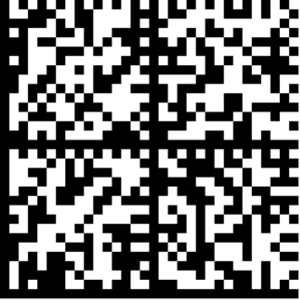 | PC:111234568408SN: 1234/-:_()edcb CH.-B.: Test.00.KEY.CHAR1M+Y usable up to: 250300 |
Ansprechpartner finden
Haben Sie Fragen oder brauchen Sie Hilfe? Unsere Übersicht hilft Ihnen, den richtigen Ansprechpartner zu finden. Dieser kann Ihnen dann weiterhelfen. Behörden wenden sich bitte direkt an den securPharm e.V.
Kontakt aufnehmen
Ansprechpartner
Haben Sie Fragen oder benötigen Sie Hilfe?
Kontaktieren Sie uns jetzt, und wir stehen Ihnen zur Seite.
Kontakt aufnehmenmade in Berlin. 2025 securPharm